
Accelerating Your VMware Migration: The Tech Behind Arcfra Migration Tool
When replacing VMware, selecting the right virtualization platform is only the first step; the efficiency and reliability of virtual machine (VM) migration are equally critical.
As a leading provider of enterprise cloud platforms, Arcfra offers the Arcfra Migration Tool (a v2v tool) for seamless cross-platform VM migration. It enables the migration of VMs running on VMware ESXi to hyperconverged clusters powered by the Arcfra Virtualization Engine (AVE), helping enterprises transition simply and efficiently.
In this article, we will explore the technical principles behind the Arcfra Migration Tool to help accelerate your transition away from VMware.
Check out this demo video to watch Arcfra Migration Tool in action.
Arcfra Migration Tool in a Brief
As a cross-platform VM migration tool, the Arcfra Migration Tool offer the following advantages:
- Supports flexible deployment and can be deployed on either the source or target virtualization platform.
- No agents are required on the VMs to be migrated, with support covering mainstream operating systems such as Windows and Linux.
- During migration, VMs can remain online with resume capability; only a brief downtime is required during incremental data synchronization, minimizing service disruption.
- Supports both single and multiple migration tasks, enabling efficient planning and reducing overall migration time.
Technical Principles Behind the Arcfra Migration Tool
The overall workflow of Arcfra Migration Tool is illustrated below. The tool performs data transfer by automatically creating snapshots, enabling VM migration with minimal service disruption. During the migration process, each VM migration task is matched with a task. From creation to completion, a task goes through multiple stages, including task creation, full data migration, incremental data migration, driver injection, VMTools installation, and network configuration.
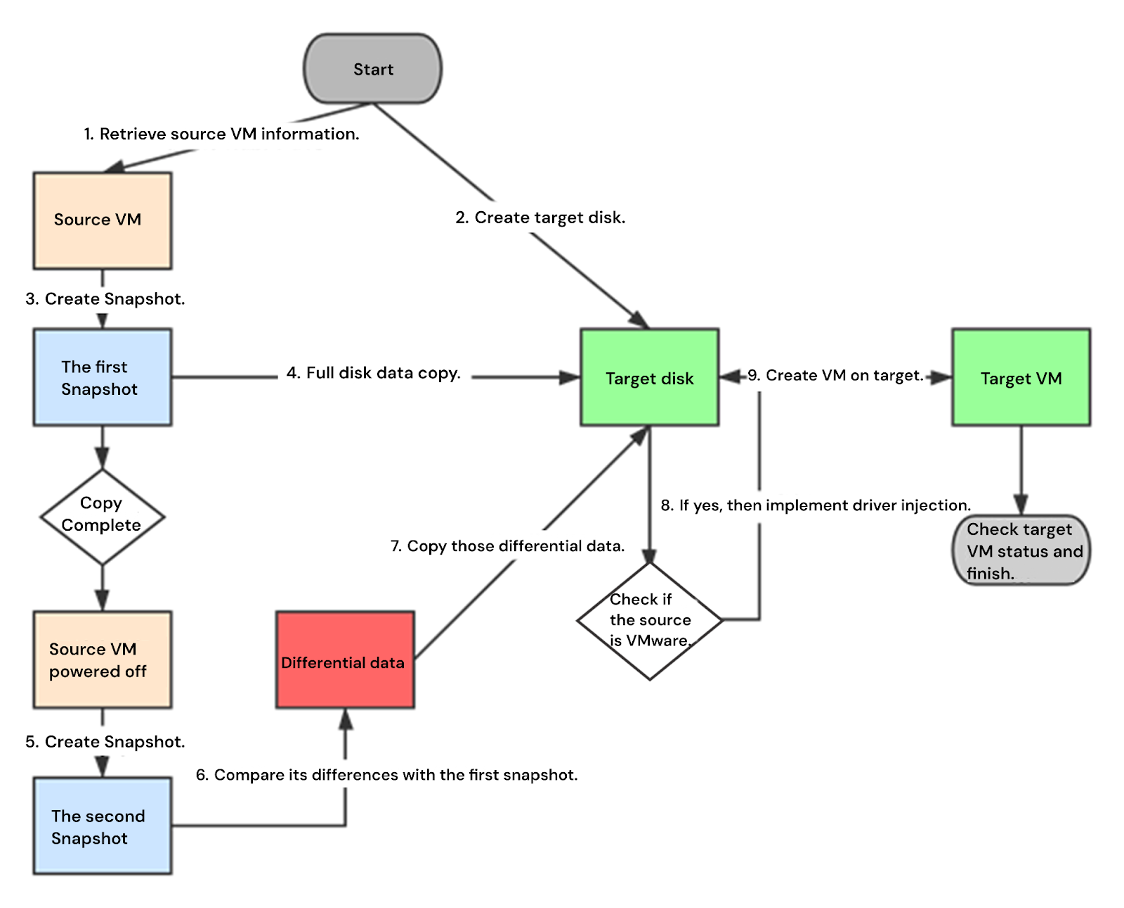
At the start of migration, the system retrieves information about the source VM and creates the target virtual disk on the target VM. It then automatically creates the first snapshot and uses VMware APIs to obtain the valid disk data regions in the snapshot, performing a full data transfer to the target VM disk.
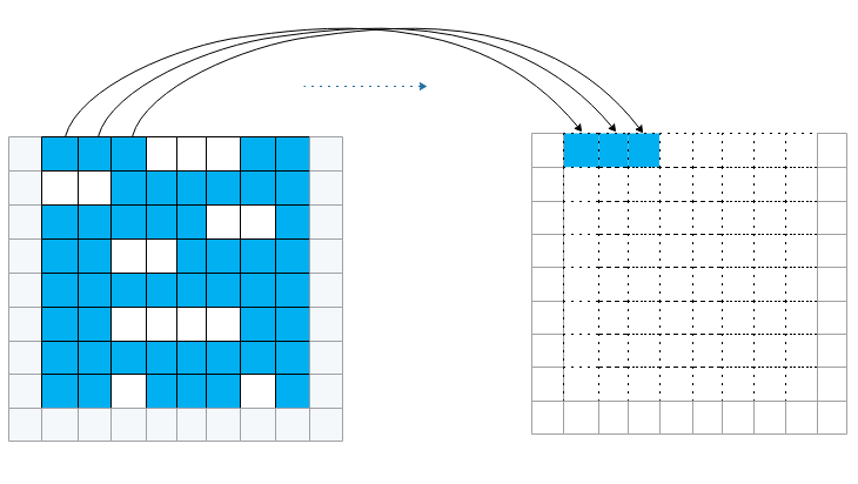
Full data migration
Full data migration is the initial stage in which all disk data from the VM snapshot is transferred. After completion, the source VM is prompted to shut down, and a second snapshot is created.
Incremental data migration follows, transferring the differential data between the two snapshots, also known as the Cutover phase. Once the full migration phase of a task is completed, the system checks the VM status to determine whether to proceed with Cutover. If the VM is already powered off, Cutover starts immediately; otherwise, it waits for the user to shut down the VM and then triggers the Cutover process via an HTTP request.
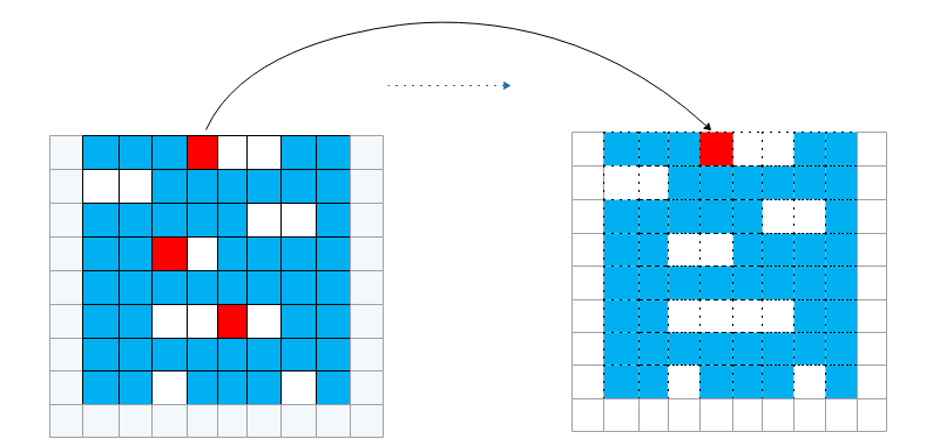
Incremental data migration
In addition, once the full data transfer is complete, users can manually synchronize incremental data without downtime. This allows most incremental data to be replicated while the VM remains online, significantly reducing downtime synchronization time.
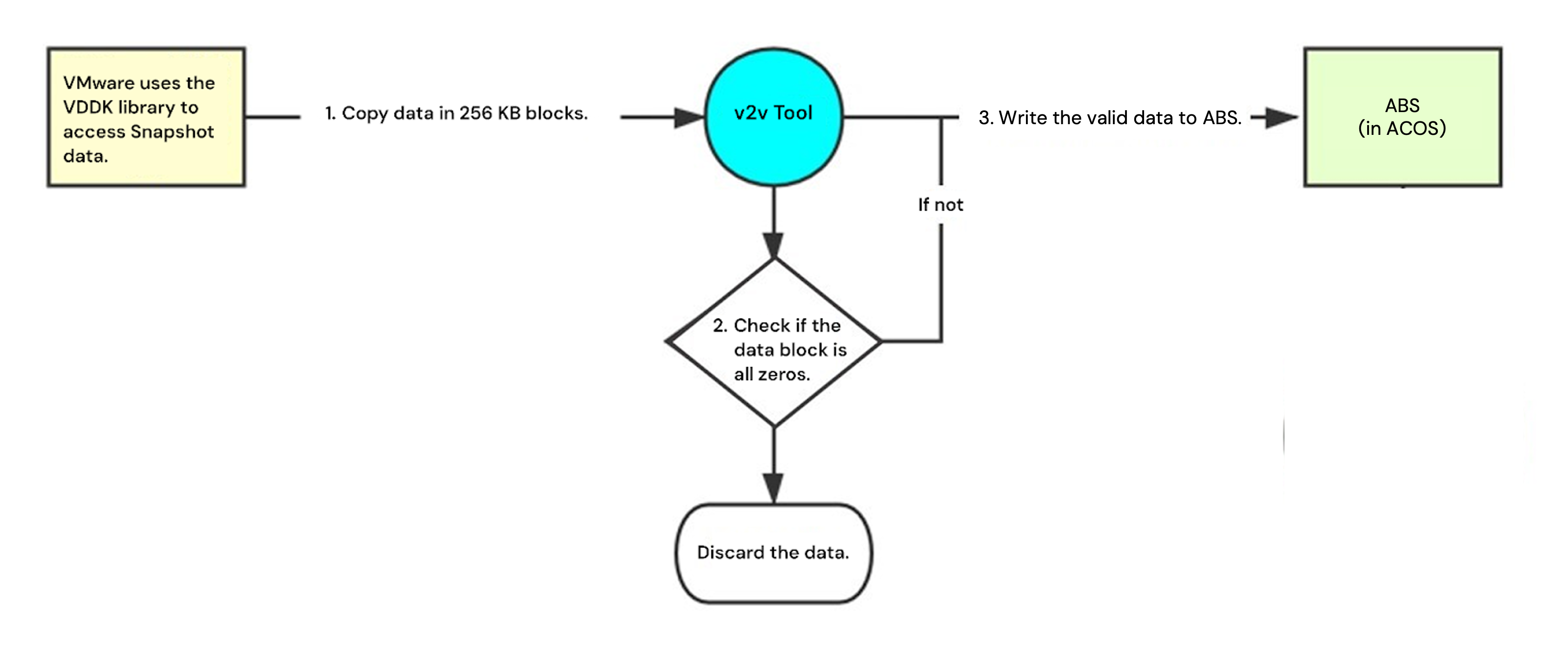
Regarding the data transferring amount, Arcfra Migration Tool read data in 256 KB blocks, processing each block immediately without caching. During full migration, the entire valid data region is transferred from the source to the migration tool, while only the non-zero blocks of the valid data region are sent from the migration tool to the target disk, improving migration efficiency.
After the incremental data transfer is complete, the system determines whether driver injection is required. VMs on the VMware platform use proprietary drivers for the Guest OS, while VMs on the AVE platform use standard Virtio drivers. Arcfra Migration Tool will automatically inject the Virtio drivers. Once data migration is finished, the necessary configuration and checks are performed on the target VM to ensure it is running correctly, completing the migration process.
Learn more about Arcfra Migration Tool and VMware-VM migration from our website and previous blogs:
What are the available VMware migration tools?
How to implement a smooth VM migration from VMware vSphere to the alternative platform?
Arcfra simplifies enterprise cloud infrastructure with a full-stack, software-defined platform built for the AI era. We deliver computing, storage, networking, security, Kubernetes, and more — all in one streamlined solution. Supporting VMs, containers, and AI workloads, Arcfra offers future-proof infrastructure trusted by enterprises across e-commerce, finance, and manufacturing. Arcfra is recognized by Gartner as a Representative Vendor in full-stack hyperconverged infrastructure. Learn more at www.arcfra.com.