
Arcfra Upgrade Center Explained: Enjoy Automated Cluster Upgrade With Three Clicks
Cluster upgrades are fundamental to the operations and maintenance of enterprise virtualization platforms, as they are essential for maintaining platform reliability, peak performance, bolstering security, and driving continuous innovation. Yet, the traditional upgrade process is often a liability, requiring frequent, complex, and error-prone manual intervention that is both resource-intensive and risky. Arcfra addresses this head-on with the introduction of the Upgrade Center within the Arcfra Enterprise Cloud Platform (AECP). By leveraging cutting-edge visualization, automation, and fine-grained control, this tool dramatically streamlines upgrades while ensuring unparalleled stability.
Why Does Arcfra Upgrade Center Matter to Your IT O&M?
As Arcfra Cloud Operating System (ACOS) clusters grow in scale and versions iterate more frequently, the limitations of traditional upgrade methods become increasingly apparent. Administrators have to manually verify version compatibility between clusters and Arcfra Operation Center (AOC), check upgrade conditions such as resource usage and kernel versions for each cluster, and manually handle VM migration, kernel upgrades, and maintenance mode switching — all of which make cluster upgrades time-consuming, error-prone, and heavily dependent on human effort.
- Invisible status: It’s hard to directly verify whether upgrade or patch files are compatible with cluster versions, CPU architectures, or operating systems. Administrators must log into each host to check details or manually terminate tasks when issues arise.
- Fragmented operations: The upgrade process is highly fragmented — uploading files, checking environments, updating kernels, migrating VMs, and switching maintenance modes — all handled separately, which easily leads to errors in large-scale environments.
- Uncontrollable risks: Without a pre-check mechanism, teams may not discover the unsatisfied upgrade conditions until the upgrade window, delaying the upgrade process.
- Heavy human efforts: Each cluster upgrade requires constant supervision, and in multi-cluster scenarios, manpower costs double, making it difficult to meet business demands for rapid iteration.
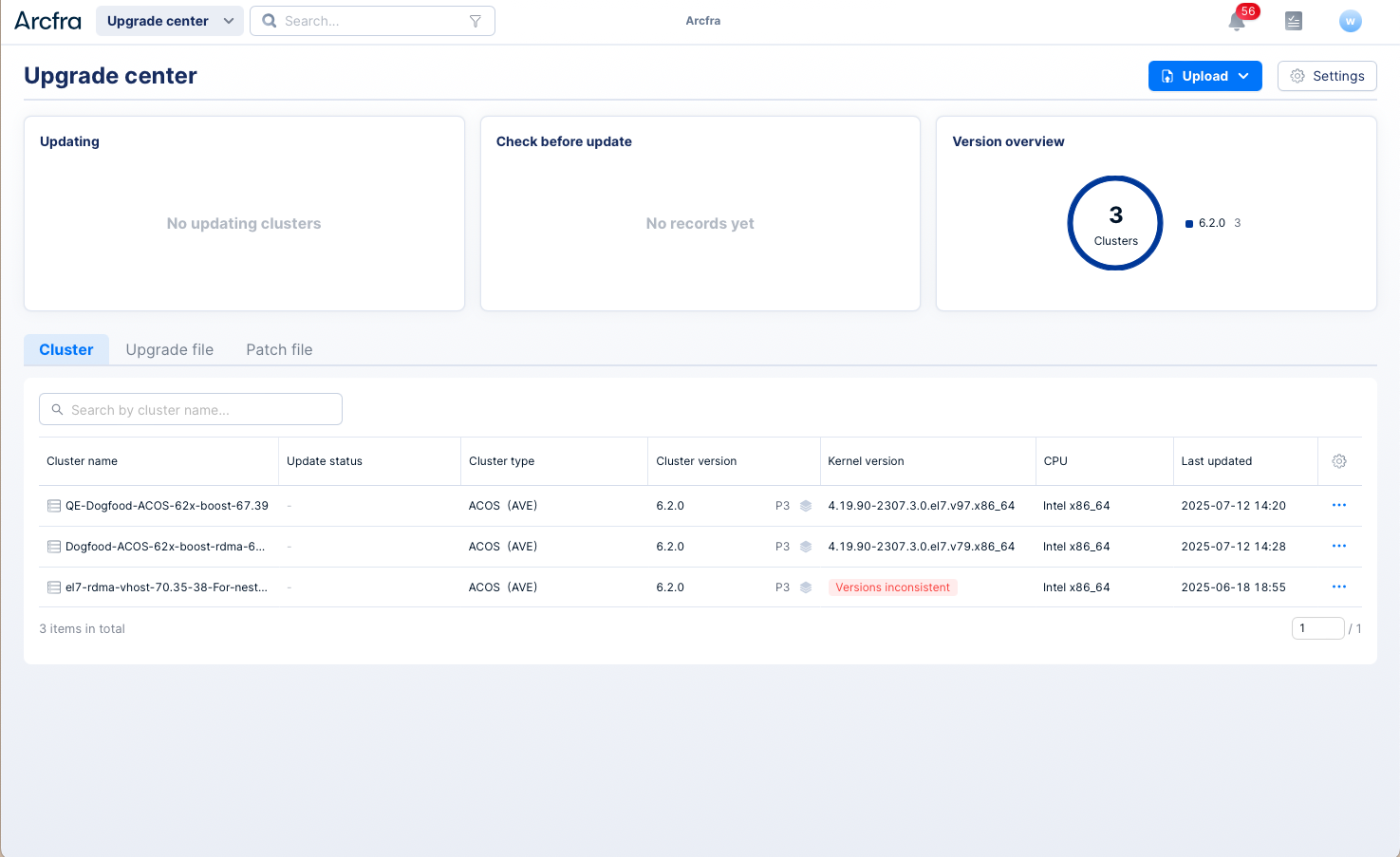
This is where Arcfra Upgrade Center comes in — by integrating the entire upgrade process into a unified management on AOC interface, it replaces repetitive manual operations with automated operations, making cluster upgrades a standardized, traceable, and efficient process.
What Are The Key Capabilities That Arcfra Upgrade Center Delivers?
Arcfra Upgrade Center provides end-to-end lifecycle management of virtualization cluster upgrade — from preparation to completion.
| Core Capabilities | Values |
| Full-State Visibility | Automatically displays critical information for cluster upgrade such as cluster and kernel versions and cluster status changes—no need to manually log in to each host. |
| Automated Workflow | Enables one-click execution for file upload, environment pre-check, cluster upgrade, kernel update, and patch installation, with VM migration and maintenance mode switching handled automatically. |
| Proactive Risk Detection | Performs comprehensive pre-upgrade checks to identify potential issues and ensure the environment meets upgrade conditions. |
| Flexible Upgrade Strategies | Enable users to choose from “Cluster Only” and “Cluster + Kernel” upgrade strategies, with configurable data recovery rates (default: 400 MiB/s) and flexible VM migration-back options (automatic or manual confirmation), designed to fit high-load business environments. |
| End-to-End Traceability | Displays detailed version and patch installation records, supports searching and viewing upgrade logs, and sends real-time status updates (success, failure, or manual intervention required) via email or Webhook—no manual supervision required. |
How Does Arcfra Upgrade Center Differ from Traditional Upgrade Methods?
Compared with manual or command-line-dependent upgrade methods, Arcfra Upgrade Center offers a far more intuitive and streamlined O&M experience.
| Comparison Aspects | Traditional Upgrade Methods | Arcfra Upgrade Center |
| Operational Complexity | ⚠️ Manual commands with scattered steps (15+ on average), prone to human error. | ✅ Unified interface—complete the entire upgrade process in just 3 steps. |
| Risk Control | ⚠️ Relies on manual validation, often missing hidden risks. | ✅ Automated precheck blocks up to 80% of potential issues in advance. |
| Efficiency | ⚠️ Before upgrade: Requires manual verification and file upload; After upgrade: Requires manual inspection and version checks. Multiple clusters double the time. | ✅ No manual checks needed, which is accurate and efficient. Supports parallel upgrades across multiple clusters with zero misoperation risk. |
| Traceability | ⚠️ Logs scattered across hosts and clusters, requiring manual collection. | ✅ Centralized log view in the upgrade center, with search support. |
How Does Arcfra Upgrade Center Enhance Enterprise O&M Efficiency and Independency?
Customer Story 1: From Fully Manual to Fully Automated — Multi-Cluster Kernel Upgrades Now Take Hours Instead of Days
Company A needed to upgrade the kernels of six ACOS clusters. Traditionally, this would require 24 hours and six rounds of repetitive steps, as each cluster had to be upgraded separately due to the high risk of parallel operations. With Arcfra Upgrade Center, the entire process was reduced to just three clicks — and fully automated from start to finish. All six clusters could now be upgraded in parallel within four hours, with zero risk of human error.
| Traditional Process | With Arcfra Upgrade Center |
| 1️⃣ Manually confirm that all clusters and hosts are healthy, with no ongoing data recovery. | 1️⃣ Select target clusters in the Upgrade Center, view details, and verify upgrade files. 2️⃣ Click to automatically run environment checks. |
| 2️⃣ Manually migrate VMs from one host to another. | 3️⃣ Choose the strategy “Upgrade kernel after cluster upgrade.” The system automatically migrates VMs to nodes with lower workloads and sufficient resources. |
| 3️⃣ Log in to each host via command-line to switch to maintenance mode. | The system automatically puts hosts into maintenance mode. |
| 4️⃣ Manually run kernel update commands and reboot the host. | The kernel is automatically upgraded and activated under maintenance mode. |
| 5️⃣ After rebooting the host, verify services, then log in again to exit maintenance mode. | Once the upgrade is done, the host automatically exits maintenance mode. |
| 6️⃣ Manually migrate VMs back to the original host (requires checking VM list) | The system automatically restores VMs based on preset policies—either immediately or after manual confirmation. |
| 7️⃣ Repeat all steps for remaining hosts. | The system automatically performs the same upgrade process on all remaining hosts. During the process, administrators can monitor VM migration status in real time through the interface, and once the upgrade is complete, the system automatically verifies that all VMs have been restored to their original state. |
Customer Story 2: From “Waiting for Support” to “Self-Control” — A Company Independently Completed a Security Patch Upgrade in Just 40 Minutes
When it comes to version upgrades or patch fixes, many IT teams assume such tasks require on-site assistance from vendor engineers or certified partners — time-consuming and schedule-dependent. But with Arcfra Upgrade Center, Company B broke that norm — its IT team independently completed a security patch upgrade in just 40 minutes, making the whole process efficient, safe, and fully under control.
Background: A sudden security patch requirement with tight deadlines
The company’s production systems run on ACOS clusters, which host core business applications and data. During regular maintenance, the IT team discovered a potential security issue that could occur under specific versions. Arcfra promptly released a corresponding Hotfix Package, and the customer needed to apply it within 24 hours to avoid delaying a new business rollout.
In the traditional workflow, the patching process would involve submitting a support ticket, waiting for vendor scheduling, and then relying on vendor engineers for remote or on-site execution. After reviewing the “Install Patch File” section in the Arcfra Upgrade Center user guide, Company B found the patching process with Acura Upgrade Center was straightforward enough to handle internally, allowing them to resolve the issue much faster.
Action: Achieving a simple, efficient, and independent upgrade within 40 minutes
Given the visualized and guided workflow in the Upgrade Center, the IT team completed the entire process — from preparation to installation — in just 40 minutes, with complete confidence in control and safety.
Step 1: Accurate patch matching to eliminate operational barriers
Through the “Upload Patch File” tab, the team simply dragged and dropped the local patch file into the interface — a visual workflow that replaces the traditional command-line input. The system automatically verified compatibility with the cluster’s version and CPU architecture, ensuring no mismatch or human error.
Step 2: Pre-checking the environment to eliminate potential risks
Before applying the patch, the team clicked “Check Environment.” The Upgrade Center then ran a comprehensive system health scan — checking host status, network connectivity, component dependencies, and even prohibited actions like manual maintenance mode switching — ensuring the patch could be safely applied.
Step 3: Full visibility with automated risk prevention
During installation, the interface displayed real-time progress of the patch deployment. The system automatically blocked any risky operations — such as adding or removing hosts or manually rebooting nodes — to keep the cluster stable throughout the upgrade.
Conclusion: Values and Benefits of Arcfra Upgrade Center
Arcfra Upgrade Center isn’t just about simplifying the upgrade process — it’s redefining how IT O&M is managed, delivering tangible value across multiple dimensions.
Values
- Higher IT Operations Efficiency: Transforms cluster upgrades from a labor-intensive task into an automated process, freeing teams to focus on innovation.
- Ensured Business Continuity: With proactive checks and automated workflows, the risk of business interruption during upgrades is reduced by up to 90%.
- Improved System Control: Standardized, auditable upgrade procedures support large-scale, multi-cluster environments.
- Faster Iteration: Supports independent upgrades and metadata updates, allowing quick adoption of new features and business requirements.
Benefits
- Efficiency Gains: Reduces multi-cluster upgrade time by 70%, and cuts manual operations by 80%.
- Lower Risk: Detects and prevents potential issues early, avoiding downtime caused by failed upgrades.
- Cost-Efficiency Optimization: Minimizes cross-team coordination and eliminates the need for dedicated on-site support.
- Enhanced Ease of Use: Intuitive graphical interface with a low learning curve — IT teams can independently complete the full upgrade process without external assistance.
More information on Arcfra Cloud Operating System and related features:
Arcfra Virtualization Engine vs. VMware vSphere: Higher Availability with Optimized Performance
Arcfra Operation Center vs. VMware vCenter for Centralized VM and Cluster Management
Arcfra VMTools Explained: Making VM Management More Visible, Controllable, and Efficient
Arcfra Virtual Machine High Availability Explained
Documentations of Arcfra Upgrade Center
Arcfra simplifies enterprise cloud infrastructure with a full-stack, software-defined platform built for the AI era. We deliver computing, storage, networking, security, Kubernetes, and more — all in one streamlined solution. Supporting VMs, containers, and AI workloads, Arcfra offers future-proof infrastructure trusted by enterprises across e-commerce, finance, and manufacturing. Arcfra is recognized by Gartner as a Representative Vendor in full-stack hyperconverged infrastructure. Learn more at www.arcfra.com.