
Same Hardware, More Done: AECP 7 Memory Overcommit and Capacity Runway Forecasting Explained
AECP 7 runs more VMs on the hosts you already own, and shows how long each cluster can run before it needs more.
Leaving VMware is usually framed as a licensing decision. The questions that decide whether the project succeeds come after the hypervisor swap: will the new platform run as many VMs per host, and how long will each cluster last before it needs more hardware?
AECP 7 answers both. In the AECP 7.0 launch article we summarized everything in the release. This post goes deeper into the two platform features that answer them: memory overcommit and capacity runway forecasting. Both run on converged clusters and on AECP Compute Edition with external storage.
Memory Overcommit: Allow for More VMs on the same hosts
Why memory runs out first
Memory has become the expensive part of a server. TrendForce expects conventional DRAM contract prices to rise another 10 to 15% quarter on quarter in 4Q26, with server DRAM still undersupplied as AI servers absorb capacity (TrendForce, September 2026).
Yet much of the memory you buy sits idle. Until now, every powered-on VM on AECP reserved its full configured memory, whether or not the guest used it. A cluster ran out of allocatable memory long before it ran out of physical memory, and the only fix was more DIMMs or more nodes.
How it works
Memory overcommit in AECP 7 is swap-based. An overcommitted VM keeps its active pages in host RAM, while pages it rarely touches can be moved to a dedicated swap space and paged back in only when the guest accesses them.
Nothing has to be installed in the guest. The swap engine runs as a user-space service on each host instead of relying on the host kernel’s own swap, so it is decoupled from the kernel version: a lightweight controller watches host memory pressure and each VM’s working set, and a separate service moves pages in and out.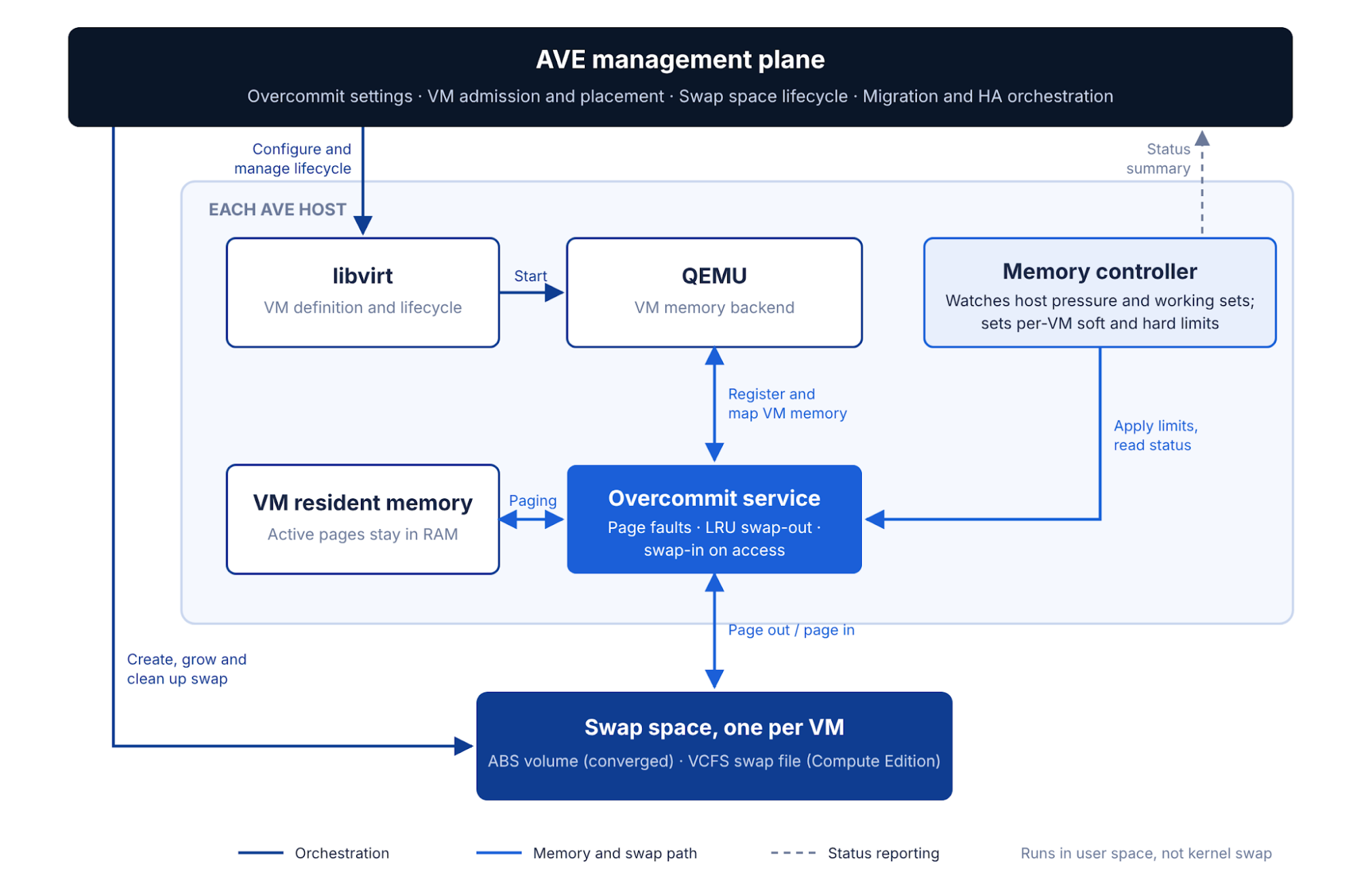
Figure 1. How AECP 7 memory overcommit works
- An isolated swap space for each VM. When an overcommitted VM powers on, AECP creates swap space equal to its configured memory, and grows it when memory is hot-added. VMs never contend for one shared host swap area.
- Converged clusters: a thick-provisioned volume with two replicas on cluster storage (three on active-active clusters), so a single disk failure does not touch VM memory.
- Compute Edition on VCFS: a thick, eager-zeroed swap file in the VM’s own directory on the datastore, much like a .vswp file on VMFS.
- Three levels of control. A cluster switch, a host switch and a per-VM switch. The per-VM setting is changed while the VM is powered off. An enabled host reserves one CPU core and 2 GB of memory for the overcommit services. VMs without overcommit keep their full memory reserved, exactly as before.
- Fully observable. Per-VM active memory, swapped memory, and swap-in and swap-out rates, plus overcommit ratios at host and cluster level and the swap space in use.
- DRS- and HA-aware. DRS scores overcommitted VMs by how much they swap, and moves VMs off heavily overcommitted hosts onto hosts with free memory. HA restarts an overcommitted VM only on a host with overcommit enabled, and raises an alert if no such host is available.
- Fast live migration under memory pressure. Swap lives on shared storage, so live migration moves only the memory in RAM and never copies swapped pages to the destination.
How to size it
The overcommit ratio is the configured memory of all powered-on overcommitted VMs on a host, divided by the host’s physical memory that is not reserved by other VMs. On a host with 512 GB of unreserved memory, a 1.5:1 ratio lets overcommitted VMs be configured with up to 768 GB in total.
For production clusters, we recommend keeping the ratio below 2:1 and watching swap-in rates as you go. Start with the workloads that tolerate it best, such as desktops, office applications, development and test, and keep full reservations for latency-sensitive databases.
Boost or overcommit, chosen per VM
On AECP Compute Edition with VCFS, the accelerated Boost mode I/O path can now be switched on per VM instead of for the whole cluster. Boost and overcommit are mutually exclusive on a given VM, so the choice follows the workload:
| Workload | Setting | Why |
|---|---|---|
| I/O-heavy databases | Boost on, overcommit off | Full memory reservation and the fastest I/O path |
| Desktops, office and test VMs | Overcommit on | Higher density where idle memory is common |
A cluster-level VCFS mode, Balanced or High Performance, sets how many CPU cores are dedicated to I/O processing.
What overcommit does not cover
VMs with passthrough devices, including GPU or vGPU, SR-IOV, PCI NICs and USB, cannot be overcommitted. Their memory stays fully reserved.
Capacity forecast and planning: Respond earlier with visualized data
Higher density raises a planning question: when will the cluster run out? Observability 1.5 adds capacity runway forecasting, which estimates how many days each cluster has before it runs short of CPU, memory or storage based on its own growth trend.
- Every cluster in one view. Sort or search all clusters by overall, CPU, memory or storage runway to find the one that will run short first.
- Runway per resource. Each cluster shows separate CPU, memory and storage runways, with the forecast plotted against actual usage. The overall runway is the shortest of the three, so the real bottleneck is never hidden.
- Trained on your own history. Forecasts use 30 to 365 days of the cluster’s monitoring data and refresh daily. Runway is shown in days up to a year, and as more than a year beyond that.
- Overcommit-aware. Memory is forecast on both usage and allocation. When memory overcommit is on, the allocation forecast is dropped, because usage is what limits the cluster.
- New clusters. Until a cluster has 30 days of data, the view shows a sample forecast and a progress counter, then switches to real forecasts automatically.
References
Recommended Readings
Arcfra simplifies enterprise cloud infrastructure with a full-stack, software-defined platform built for the AI era. We deliver computing, storage, networking, security, Kubernetes, and more — all in one streamlined solution. Supporting VMs, containers, and AI workloads, Arcfra offers future-proof infrastructure trusted by enterprises across e-commerce, finance, and manufacturing. Arcfra is recognized by Gartner as a Representative Vendor in full-stack hyperconverged infrastructure. Learn more at www.arcfra.com.