
Why Does VMware Replacement Take 2-4 Years or Even Longer?
Key Takeaways
VMware replacement often takes 2–4 years because enterprises are not only replacing a hypervisor. They are untangling years of dependency across an integrated infrastructure stack that includes compute, storage, networking, disaster recovery, Kubernetes, backup, operations, automation, and ecosystem integrations. Gartner estimates that a midsize enterprise needs at least two years to untangle VMware dependencies, while large-scale migrations can run 18–48 months in total. The timeline becomes even longer when teams treat replacement as a vSphere cutover first and only later discover gaps in vSAN, NSX, SRM, Tanzu, Aria, or adjacent operational tooling.
Why Does VMware Replacement Take 2–4 Years or Even Longer?
Gartner’s Timeline Reflects Dependency Untangling, Not Just VM Copy Time
According to Gartner’s report Assessing the Technical Challenges of VMware Migrations, a midsize enterprise needs at least two years to untangle VMware dependencies, while large-scale migrations can run 18–48 months in total. This reflects the whole time needed for dependency untangling, not just the simple swapping of Hypervisor.
VMware Cloud Foundation is an integrated stack built around vSphere, vSAN, NSX, Tanzu, SRM, and Aria (vRealize). Over 10–15 years, many enterprises have built operational processes, application dependencies, security models, backup policies, DR plans, and management workflows around these layers.
That is why VMware replacement is a platform architecture decision. Replacing vSphere may be the most visible part of the project, but it does not automatically replace the rest of the VMware operating model. Each missing layer then needs to be re-sourced, integrated, tested, operated, and supported, ultimately delaying the whole replacement process.
Gartner also characterizes Broadcom as a networking vendor first, a storage supplier second, a management tools provider third, and only then a virtualization vendor. The implication for migration teams is direct: NSX, vSAN, and Aria should not be treated as peripheral add-ons. They are major parts of what must be evaluated and replaced.
Migration Can Take 1–2 Years Due to Workload Tiering and Parallel Validation
VMware migration in enterprise environments is a phased program. According to Gartner’s report Quick Answer: Estimating a Large-Scale VMware Migration, a 2,000-VM environment typically requires 12–24 months to fully migrate when managed responsibly.
Early waves may include lower-risk workloads, development environments, or applications with simpler dependencies. Later waves usually involve Tier-1 applications, databases, ERP systems, regulated workloads, or applications with strict RPO/RTO requirements. These workloads require deeper validation before migration.
During this period, both VMware and the new platform often run in parallel, which means the new platform’s functionality breadth and capability depth are tested against real production workloads while the migration is still in progress. If the new platform cannot absorb certain workload tiers early, the VMware decommissioning timeline extends.
In particular, a platform failing to provide enterprise-grade capabilities requires significant additional investment within 12–18 months to close capability and depth gaps — at a time when migration debt from the first selection is still being paid down.
The Wrong Replacement Decisions Can Make the Timeline Even Longer
A hypervisor-only replacement may be quick to deploy, but expensive to complete. Once teams discover that storage, DR, SDN, Kubernetes, backup, and operations management require separate tools, they may recreate the fragmentation VMware originally helped reduce.
Ultimately, the real cost of a wrong decision can be a five-year re-architecture, making an 18–48 month migration into a longer platform rebuild.
How Enterprises Can Reduce Timeline Risk
Enterprises can reduce timeline risk by evaluating VMware alternatives before the POC phase using a structured breadth and depth framework.
- Platform breadth asks whether the platform covers every functional layer that the VMware stack covered.
- Platform depth asks whether each capability actually meets enterprise-grade requirements.
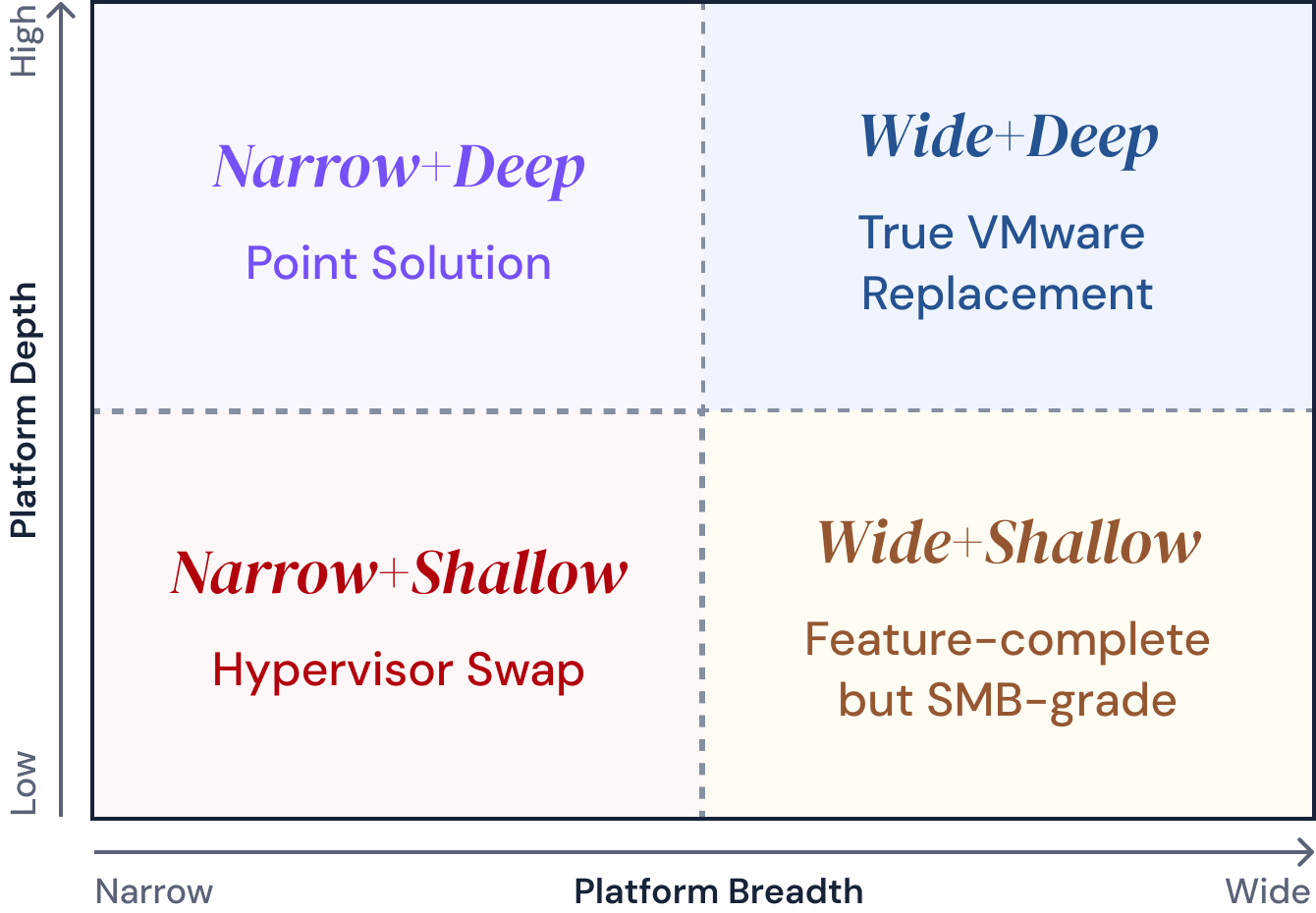
Plotting breadth against depth produces four categories based on vendor capabilities evaluation:
- Narrow + Shallow (hypervisor swap): fails 8+ breadth capabilities immediately. Fast to deploy, expensive to complete.
- Narrow + Deep (point solution): excellent in one or two layers; requires 3+ additional vendors to cover the rest. Creates re-fragmentation.
- Wide + Shallow (feature-complete but SMB-grade): passes the breadth checklist on paper; collapses under Tier-1 enterprise workloads at scale. Gaps surface 12–18 months post-migration.
- Wide + Deep (true VMware replacement): covers all 8 capability areas natively and meets enterprise-grade depth criteria at each layer. The only quadrant that eliminates re-fragmentation risk over a 5-year horizon.
We also provide a 56-question checklist to guide your RFP and POC processes. Each question has a clear pass criterion that differentiates enterprise-grade from SMB-grade implementations.
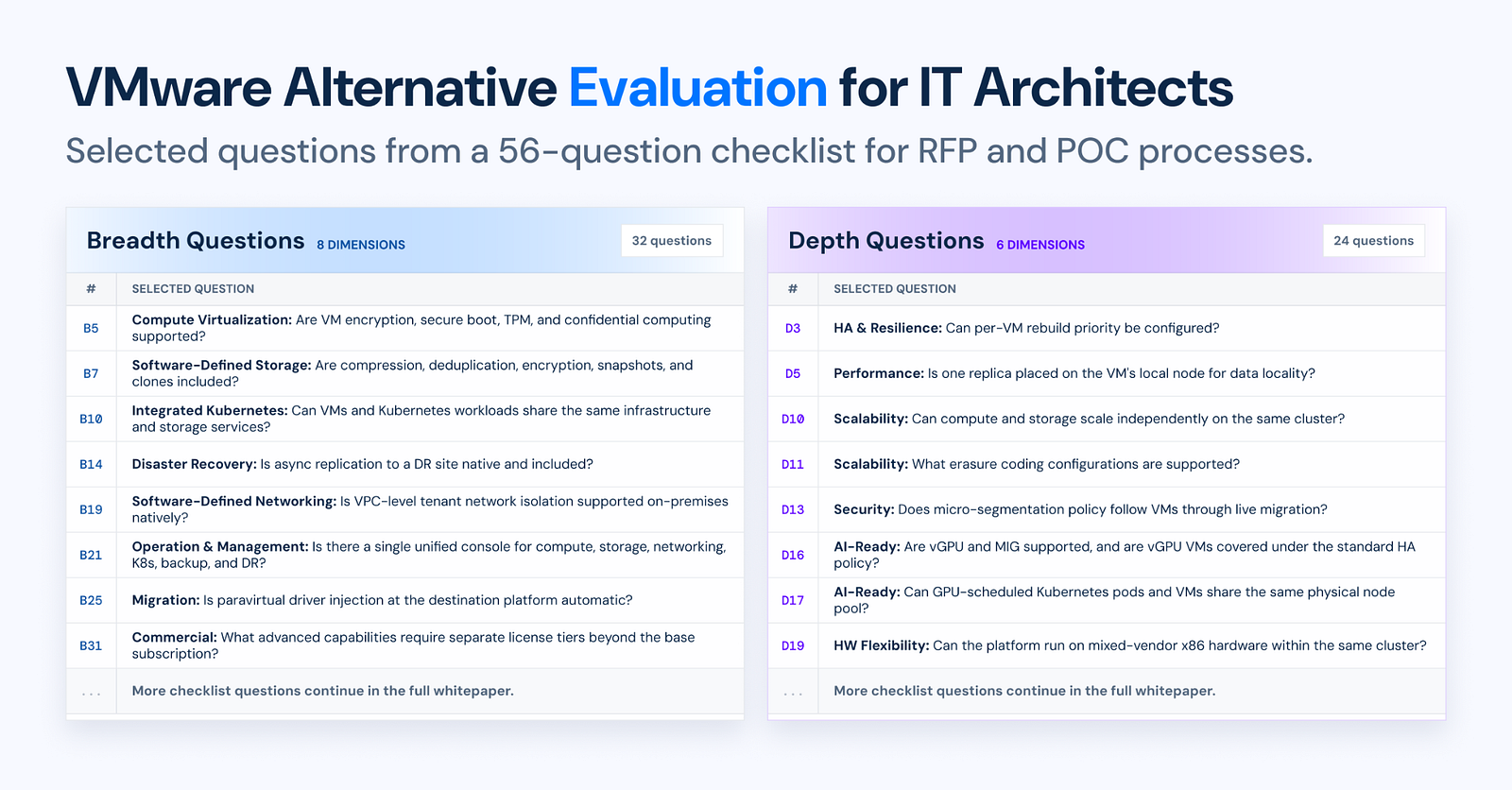
For the complete VMware alternative evaluation framework, vendor comparison, and 56-question RFP and POC checklist, download the white paper: Beyond the Hypervisor Swap: Why VMware Replacement Demands Both Platform Breadth and Depth.
Arcfra simplifies enterprise cloud infrastructure with a full-stack, software-defined platform built for the AI era. We deliver computing, storage, networking, security, Kubernetes, and more — all in one streamlined solution. Supporting VMs, containers, and AI workloads, Arcfra offers future-proof infrastructure trusted by enterprises across e-commerce, finance, and manufacturing. Arcfra is recognized by Gartner as a Representative Vendor in full-stack hyperconverged infrastructure. Learn more at www.arcfra.com.