
Arcfra Migration Tool 2.0: Migrate 100 VMs in One Day with Bulk Configuration
As enterprises’ VMware replacement moves from pilot validation to large-scale rollout, VM migration is becoming a delivery challenge measured not only by technical feasibility, but also by operational efficiency and project control. When hundreds or even more VMs need to be migrated, tasks such as selecting target clusters, configuring network mappings, setting storage policies, arranging migration windows, and tracking progress — all manually operated VM by VM — can quickly become a major burden.
To address these challenges, Arcfra introduces Arcfra Migration Tool 2.0. Designed for large-scale VMware VM migration, this release is built on a distributed Controller + Worker architecture and upgrades capabilities across unified migration plans, batch operations, process observability, and report export.
Together, these upgrades help operations teams deliver production-grade VM migration projects more efficiently. With Arcfra Migration Tool 2.0, teams can configure migration settings for 100 VMs in minutes and complete the migration within a day, easily meeting the project requirements involving thousands of VMs.
Batch Operations and Process Control: Two Critical Bottlenecks in Large-Scale VM Migration
Cost of Creating and Managing Batch Migration Plans
Many VM migration optimizations still focus on single-VM configuration, such as installing VirtIO drivers in advance or converting disk formats. For large-scale migration, if each migration task is still created, configured, and tracked separately, migration teams must repeatedly handle source selection, target placement, network mapping, storage policies, VM parameters, and execution schedules. When the migration scope expands to hundreds of VMs, task setup alone may take hours and significantly increase project cost.
Complex Target Resource Allocation and Cross-Cluster Placement
Large-scale migration rarely places all VMs into a single target cluster. Different business systems may need to land in different clusters, storage policies, or network zones. Without unified configuration and batch assignment, migration teams must split many tasks and manually maintain mapping relationships, which significantly slows migration preparation.
High Scheduling Pressure for Concurrent Migration
Large-scale migration requires higher throughput, yet more concurrent tasks do not always yield better results. Migration consumes resources from the source VMware environment, the target platform, migration Worker nodes, and migration network bandwidth. Without visibility into Worker load, task queues, and bandwidth usage, teams cannot easily determine whether current concurrency is appropriate or adjust migration batches in time.
Window Pressure During Incremental Synchronization and Cutover
Generally, the final cutover of production systems should be completed within a designated maintenance window. Migration teams need to minimize the amount of incremental data transferred during downtime and reserve more of the maintenance window for final synchronization, target-side startup, and business validation. If incremental synchronization and cutover still rely on per-VM operations, both execution efficiency and control during the window are affected.
Need for Continuous Process Visibility and Project Management
Migration teams need continuous visibility into overall progress, running tasks, failed tasks, VMs ready for cutover, and potential pressure on Workers or network links. Without a unified view, migration can easily become a time-consuming project dependent on spreadsheets, screenshots, and manual communication.
In other words, large-scale migration is focused not only on migrating data of single virtual machines, but on enabling batch migration to be plannable, schedulable, observable, batch-executable and deliverable.
Arcfra Migration Tool 2.0: Four Upgrades for Large-Scale VMware Migration
To address the operational and management challenges of large-scale VMware VM migration, Arcfra Migration Tool 2.0 upgrades architecture, management, operations, and monitoring capabilities to help enterprises improve batch migration efficiency and project delivery control.
Architecture Upgrade: Higher Transfer Concurrency
Users can deploy the migration tool with a controller-worker architecture:
- The controller provides the web console and is responsible for creating and scheduling migration plans, as well as monitoring their status.
- The worker performs the actual data migration. Each environment includes one local worker by default and supports adding remote workers to increase transfer concurrency.
With this architecture, IT teams no longer need to create and track migration tasks VM by VM. VMs from the same batch, business system, or migration window can be included in a unified migration plan and centrally managed and scheduled by the Controller.
In multi-Worker environments, the Controller automatically selects the Worker node for a migration task based on site mount status and current load. Users do not need to manually assign a Worker for each VM, which reduces scheduling complexity. Enterprises can deploy additional Worker nodes to scale concurrency according to migration network bandwidth, source VMware load, target resources, and business-window requirements.
Management Upgrade: Unified Migration Plans with Custom Operation Options
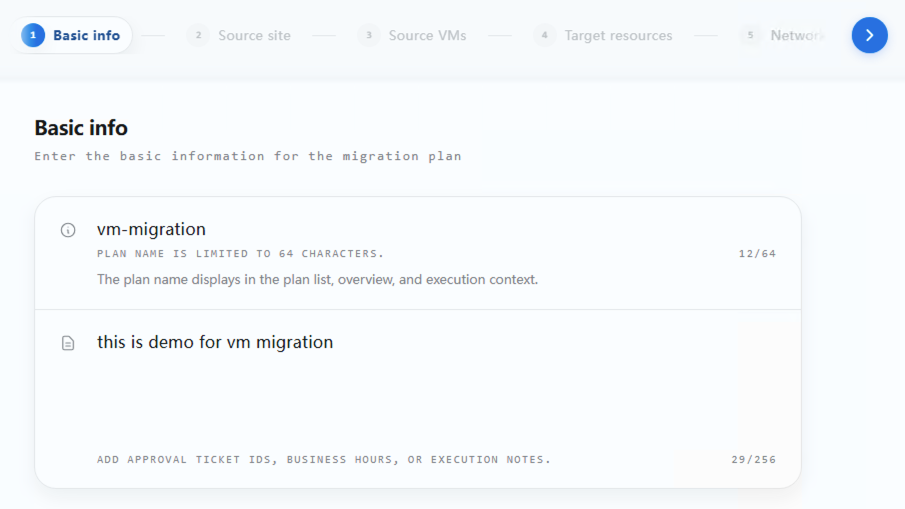
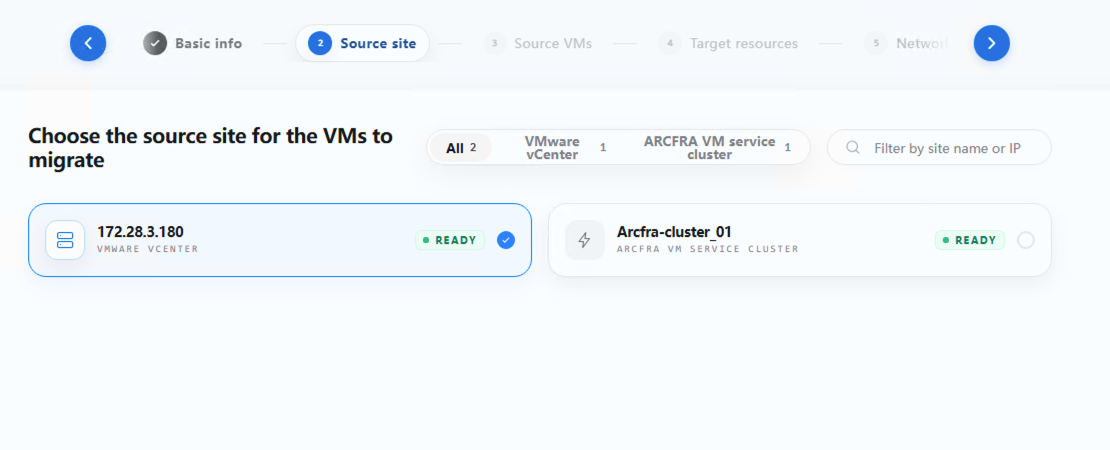
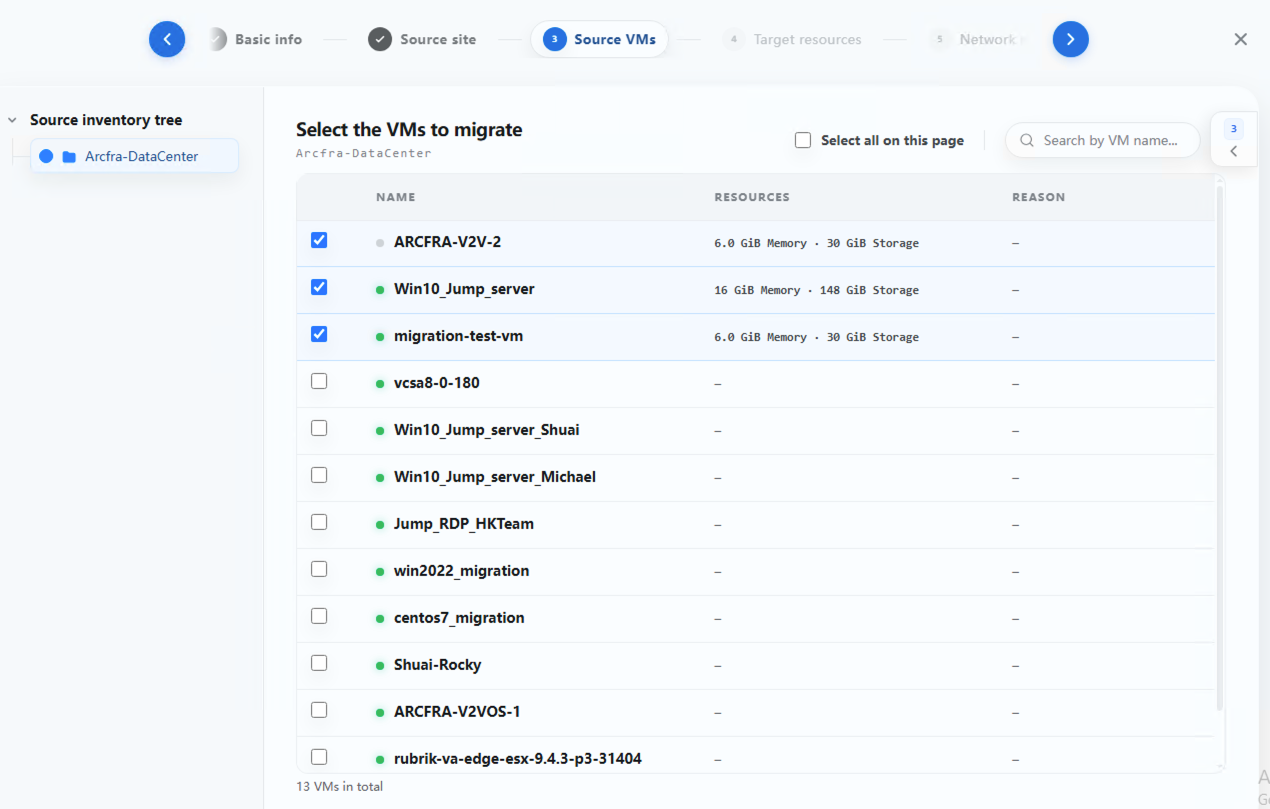
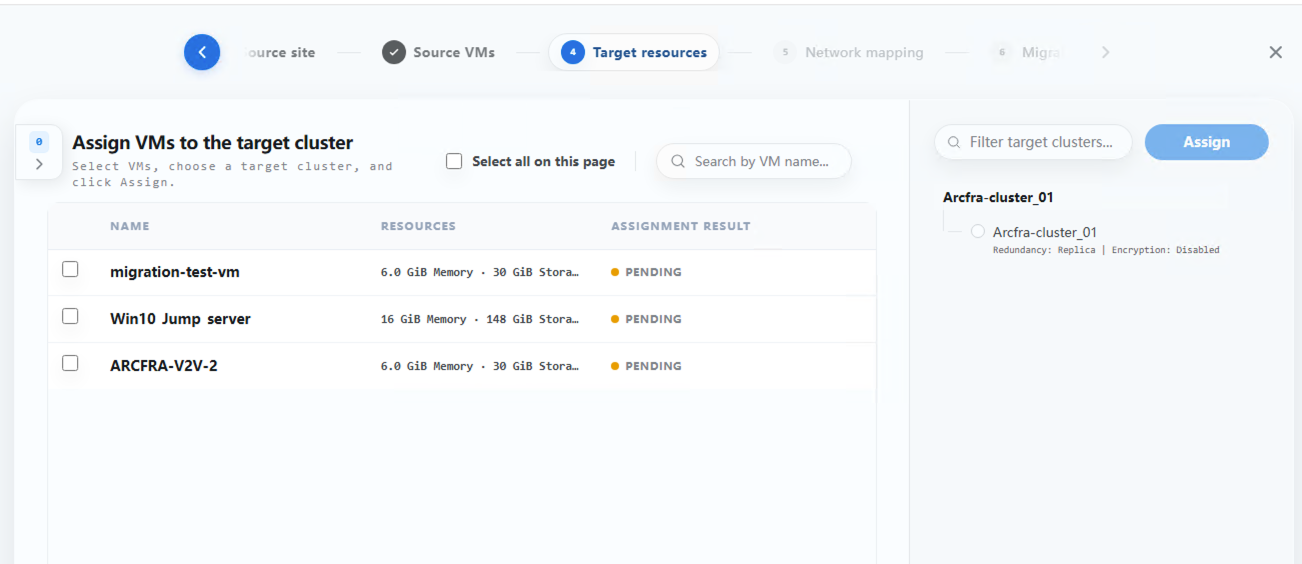
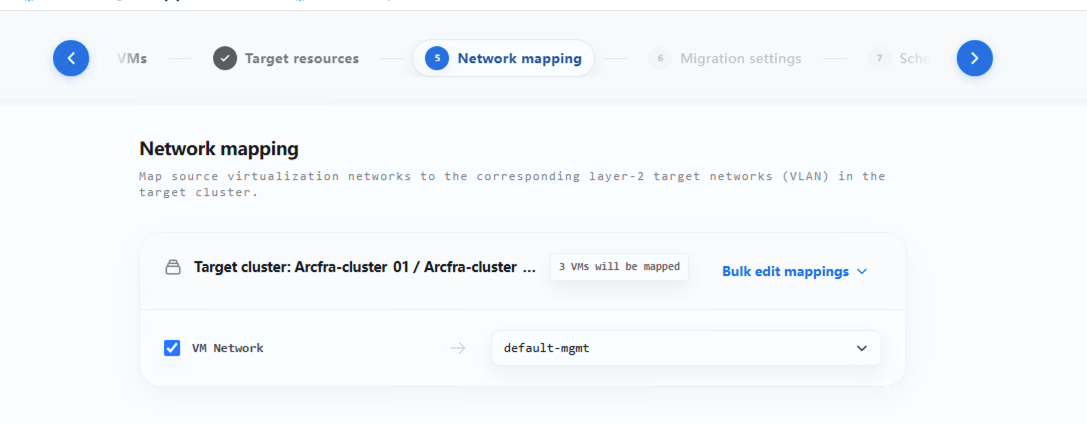
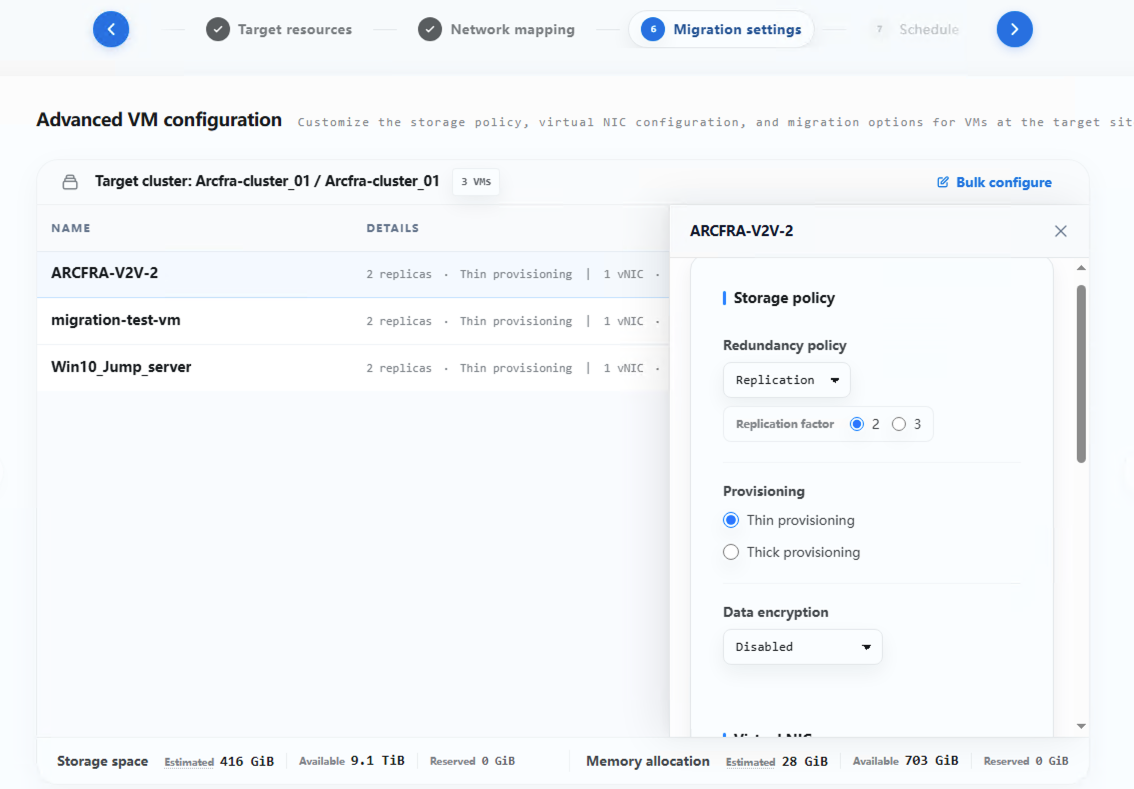
Arcfra Migration Tool 2.0 replaces separate task creation with unified migration plans. During plan creation, users can complete configuration through a 7-step setup wizard covering basic information, source site, VM selection, target cluster assignment, network mapping, VM configuration, and scheduling.
Users can define migration subject, target placement, network mappings, storage policies, VM settings, and execution time during plan creation, while tracking multiple VMs from the same business system in one plan. With this workflow, users can complete batch migration settings for a hundred of VMs in about five minutes and avoid large amounts of repetitive manual work.
1. Enter the basic information for the migration plan
2. Choose the source site for the VMs to migrate
3. Select the VMs to migrate
4. Assign VMs to the target cluster
5. Configure network mapping
6. Complete advanced VM configurations
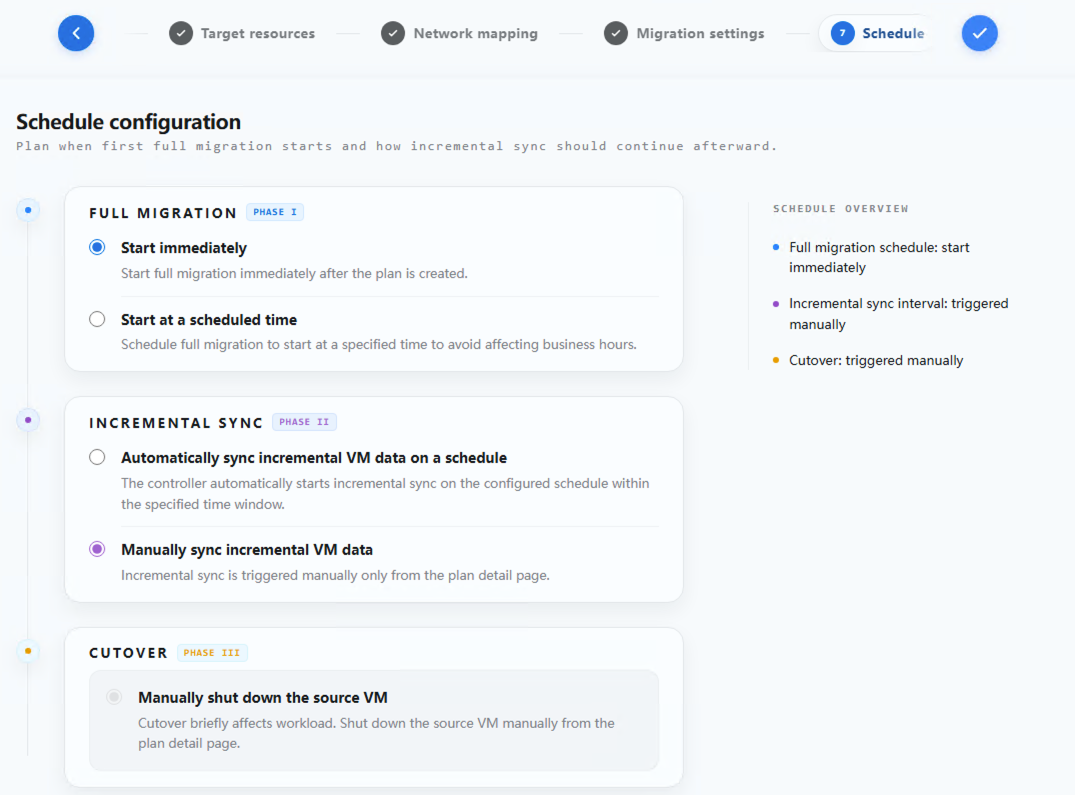
7. Schedule the migration
Acfra Migration Tool 2.0 also provides abundant custom operation options to meet the varied migration demands of different business VMs.
Assign VMs to Different Target Clusters
Within the same migration plan, users can migrate VMs to different target clusters according to the target cluster’s resource status, storage policies, and business planning, then configure the corresponding network mappings and VM parameters in later steps.
This capability supports multi-cluster, multi-business-domain, and phased placement demands while reducing the work required to create separate migration tasks for different target clusters.
Customize Cutover-Related Policies
With Arcfra Migration Tool, VMs are migrated through two main stages: full data transition and incremental data transition. During the full data copy stage, source VMs can remain online throughout the process. During the final cutover, source VMs need to be shut down temporarily to synchronize the last round of incremental data, resulting in a brief service interruption. After multiple rounds of scheduled incremental pre-synchronization, the final cutover synchronization is typically completed within 5 minutes. The actual duration may vary slightly depending on the size of the original dataset. >>Learn more
Acfra Migration Tool 2.0 supports configuration of full migration, incremental synchronization, and cutover policies within a migration plan. Full migration can be triggered immediately or scheduled for a specified time, making it easier to arrange data transfer during an appropriate window. After full migration is complete, incremental synchronization can be triggered manually or automatically on a recurring basis. The minimum automatic synchronization interval is one hour, and synchronization can be restricted to a specified time window.
By completing multiple rounds of incremental synchronization before the final cutover, migration teams can reduce the amount of data that need to be transferred during downtime and reserve more of the limited maintenance window for final synchronization, target-side startup, and business validation.
Operation Upgrade: Batch Ops Improve Migration Execution Efficiency
Arcfra Migration Tool 2.0 provides management entry points at different levels, including the migration plan list, migration plan details, and individual VM details. On the plan details page, users can select multiple VMs and perform batch operations such as incremental synchronization, cutover, archive, and cleanup. For large-scale migration scenarios, migration teams can view the migration stage of VMs in the same plan and apply the next action to eligible VMs in one place, instead of repeatedly entering individual task detail pages.
For abnormal tasks, Arcfra Migration Tool 2.0 also provides operations such as pause, resume, cancel, retry, and bandwidth limit editing, making it easier to handle failed tasks or adjust transfer policies for running tasks during migration.
Monitoring Upgrade: Global Dashboard and Worker Views Make Migration Observable
Large-scale migration requires a unified view. Arcfra Migration Tool 2.0 adds an overview page where users can see global migration status and system health summaries, including task overviews, migration trend dashboards, system health and capacity, and historical task summaries.
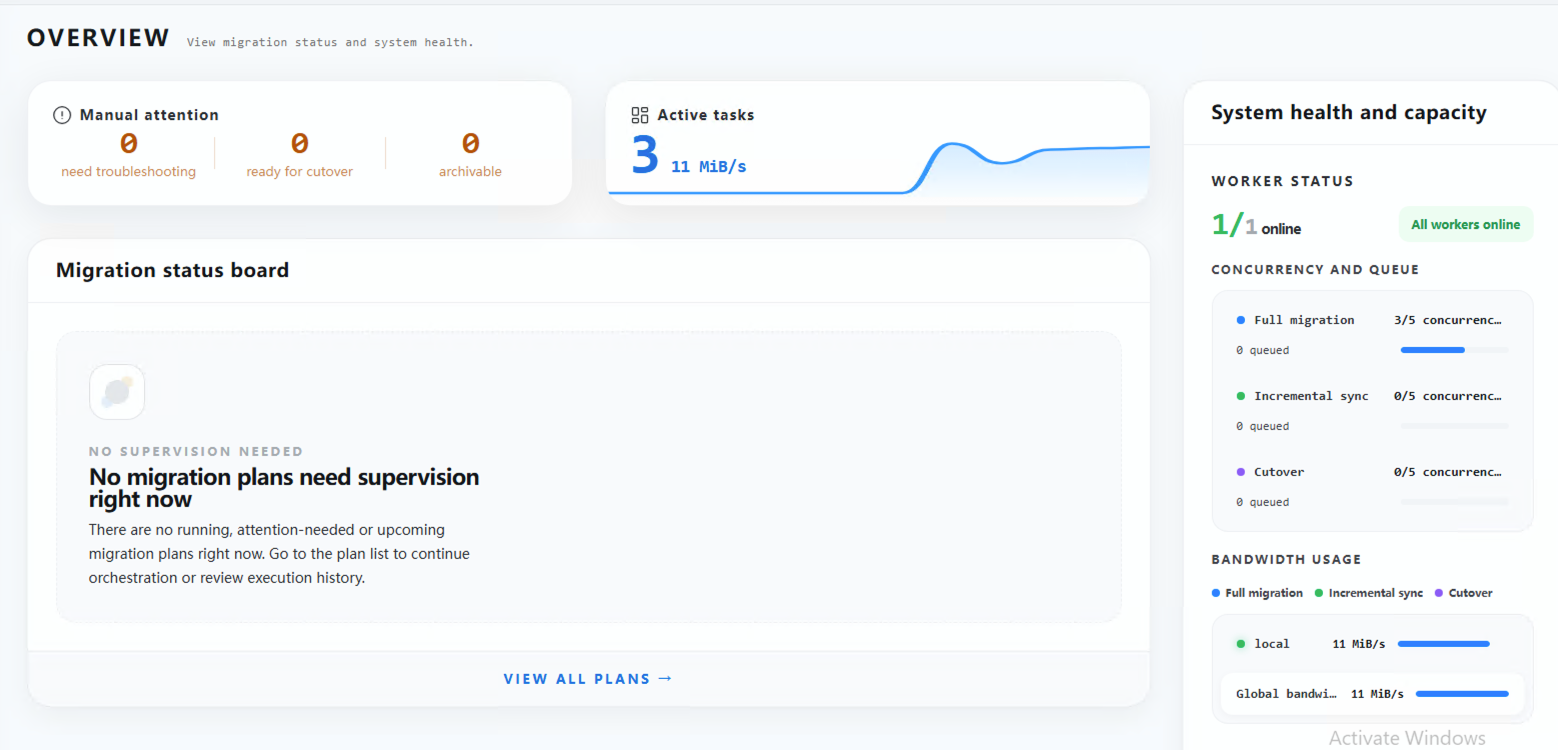
The system health and capacity area shows Worker node status, concurrency and queue information, bandwidth usage, and site status. The migration plan list and detail pages show overall plan progress, VM status distribution, and the migration stage of each VM, helping teams evaluate migration progress.
Arcfra Migration Tool 2.0 also adds a Worker node page that shows the health status, active tasks, queued tasks, estimated completion time, version attributes, DNS servers, and mounted sites for all registered Workers. Data refreshes automatically every 30 seconds. In multi-Worker concurrent migration use cases, this view helps teams quickly identify unreachable nodes, task queues, or bandwidth pressure.
For migration reporting and compliance requirements, Arcfra Migration Tool 2.0 supports exporting migration plans locally in CSV or PDF format. These reports can be used for structured analysis, phase reviews, and reporting archives, reducing dependence on manual statistics and spreadsheet consolidation.
Conclusion: Making VMware Alternative Enterprise-Grade
Production-grade VMware replacement requires enterprises to migrate and validate batches of VMs within limited business windows and across multiple platform resource constraints. Enterprises need more than a tool that can migrate a single VM. They also need migration platform capabilities that support batch planning, concurrent execution, continuous monitoring, and deliverable reporting.
With Arcfra Migration Tool 2.0, Arcfra helps IT teams spend less time on repetitive operations and manual statistics, and more time on batch design, business validation, and risk control. This improves overall delivery efficiency for large-scale migration projects and makes VMware replacement simpler, faster, and more controlled.
In addition, for pre-migration asset discovery and information preparation, Arcfra Operation Center (AOC) provides built-in VM asset statistics. It can help replace RVTools for pre-migration inventory and resource analysis, allowing operations teams to centrally understand which VMs exist, which hosts they run on, how much CPU and memory they use, which disks they mount, what IP addresses they have, and which clusters and data centers they belong to. This lowers the preparation barrier for batch migration.
Download the Migrating From VMware to Arcfra: A Complete Guide to access detailed solutions for migrating workloads from VMware virtualized environments to Arcfra AECP.
Recommended readings:
- How to Improve VMware Migration Efficiency? Test with Arcfra Migration Tool: 100 + VMs Migrated In 5 Days
- VMware Alternative Guidebooks 2026: The Definitive Guide to Strategy, Evaluation, and Migration
- Navigating VMware Migration: From Planning to Execution
- Accelerating Your VMware Migration: The Tech Behind Arcfra Migration Tool
- Whitepaper | Beyond the Hypervisor Swap: Why VMware Replacement Demands Both Platform Breadth and Depth
- How to Make A Risk-Free Plan for VMware Replacement?
Arcfra simplifies enterprise cloud infrastructure with a full-stack, software-defined platform built for the AI era. We deliver computing, storage, networking, security, Kubernetes, and more — all in one streamlined solution. Supporting VMs, containers, and AI workloads, Arcfra offers future-proof infrastructure trusted by enterprises across e-commerce, finance, and manufacturing. Arcfra is recognized by Gartner as a Representative Vendor in full-stack hyperconverged infrastructure. Learn more at www.arcfra.com.